
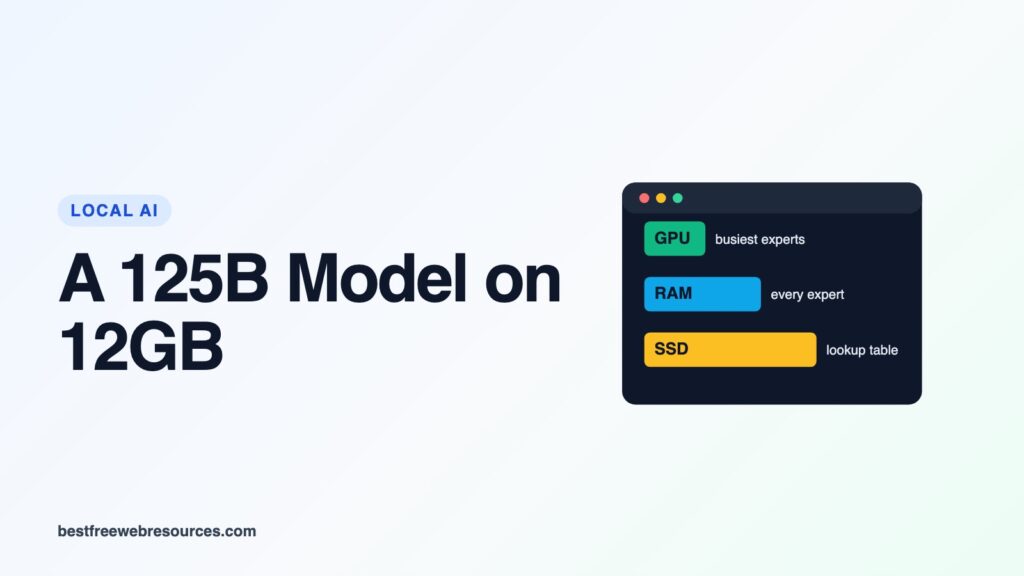
Strata is a free, open-source engine that runs one very large model, Qwen3.8-Flash-Next, on an ordinary gaming PC. The model has 125 billion parameters in its main network, plus a 51-billion-parameter n-gram table, and Ollama’s 4-bit build is a 120GB download that does not fit a 128GB machine. Strata’s answer is to stop trying to fit it on the graphics card. It splits the model across the card, system RAM and the SSD, and lets the processor do part of the work.
The project appeared on GitHub on 24 September 2026 and is the top rising query related to “local llm” in Google Trends for the past 30 days (US). This guide covers what it needs, which size to download, what speeds its maintainers report, and the licence that comes with the model. BFWR has not run Strata; every speed figure below is the project’s own measurement and is labelled as such.
Quick answer
- What it runs: Qwen3.8-Flash-Next only, in 2-bit to 8-bit builds, plus a code-focused “Coder” version and a fine-tune called Swift 1.5.
- Minimum hardware: an NVIDIA RTX 20-series or newer, or a supported AMD Radeon, with 12GB of VRAM, plus 32GB of RAM and about 80GB of free disk. 64GB of RAM runs every 2-3-bit size.
- Reported speed: 53 to 94 tokens per second on an RTX 5070 with 64GB of RAM, depending on the size (maintainers’ measurement).
- Licence: Strata itself is MIT. The model is under the Qwen Community License 1.0, whose two conditions carry over to every compressed build.
- Maturity: three weeks old, 51 releases, over 1,000 open issues and pull requests, and no outside security audit. Treat it as a fast-moving early project.
What Strata is
Strata (Niko1221/Strata on GitHub) is an inference engine written for a single model. It borrows parts of llama.cpp’s ggml library but is not a fork you can point at any GGUF. As of 16 October 2026 the repository has about 25,800 stars, 2,665 forks and 1,025 open issues and pull requests, and it shipped 51 releases between v0.1.0 on 24 September and v0.1.44.1 on 14 October. That pace is worth knowing before you build a workflow on it: the settings and file layout are still moving.
Windows and Linux are the supported platforms. Apple Silicon Macs, Intel Arc, AMD Strix Halo, older cards such as the Tesla P40 and Radeon VII, and processors without AVX2 are listed as experimental, built from source and tested by community members.
How a 125B model fits on a 12GB card
Qwen3.8-Flash-Next is a mixture-of-experts model. Its config.json lists 48 layers with 512 experts each, and 10 of them are used for every token. That is 24,576 small expert networks, of which only a few hundred do any work on a given word. Strata exploits that:
- The graphics card holds the parts every token needs (attention, routers, shared experts, the output head, the KV cache) and fills the rest of its memory with the experts used most often. The cache adapts to the conversation.
- System RAM holds every expert. When a token needs one that is not on the card, the processor computes it in RAM, at the same time as the card works on the cached ones.
- The SSD holds a 28.8GB n-gram lookup table, the model’s second file, of which only a few rows are read per token.
- Guess, then check: the model’s own multi-token-prediction layer drafts up to three tokens and the full model verifies them in one pass. The project reports 1.6 to 1.8 times faster answers with identical output, because the big model still decides every token.
One consequence surprises people: more VRAM matters more than a faster GPU. Strata’s documentation puts it at about 700 extra experts per gigabyte of VRAM, and the arithmetic checks out. The Q2_0 build keeps 34GB of experts in RAM, which is about 1.4MB per expert across 24,576 of them, so each extra gigabyte on the card holds roughly 720 more, and each one the card holds is one the processor no longer has to compute.
The same design is why the tokens-per-second estimates on BFWR’s hardware pages do not apply here. Those use memory bandwidth divided by the weights that must be read, which assumes the whole model sits in fast memory. Strata deliberately splits the work across the GPU and the CPU, so only measurements tell you how it performs.
Which size to download
The three smallest sizes come from ISTA-DASLab, who compressed the model with their own GSQ and RCO methods. Each build is two files: the first is loaded at start-up, the second is the 28.8GB table that stays on the SSD. The sizes below are the first files as published on Hugging Face, which Strata’s documentation also gives as the combined RAM and VRAM requirement.
| Size | Loaded file | Experts kept in RAM | Smallest RAM that fits | Project’s note |
|---|---|---|---|---|
| Q2_0 | 37.6 GB | 34 GB | 48 GB | fastest |
| IQ2_XS | 39.2 GB | 35.5 GB | 48 GB | recommended |
| IQ3_XXS | 47.0 GB | 43 GB | 64 GB | slower, better |
| IQ3_S | 54.8 GB | 50 GB | 64 GB, little else open | slowest, best |
| Coder (IQ1_M) | 29.6 GB | 23 GB | 32 GB | half the experts, for code |
The rule behind the RAM column is in the project’s sizing guide: it fits when RAM is at least the experts plus about 10GB for the operating system and your other programs. The download is 66 to 76GB for the three smaller sizes, and the first start fetches the draft layer as well, about 6GB more.
The Coder is a compromise, not a smaller copy. It keeps 256 of each layer’s 512 experts, chosen on code data. In Strata’s own words, it is “weaker outside code and in languages other than English”, and a GitHub issue records Chinese answers coming out wrong or looping. Its authors report 91% of the full model’s SWE-bench Verified score. If you have 48GB of RAM or more, the project recommends a full-expert size instead.
With 96GB or more, Strata can also load Unsloth’s 4- to 8-bit files of the same model, from a 94GB UD-IQ4_XS up to a 188GB Q8_0. Below the RAM those need, Strata reads the missing experts from the SSD while it answers, which the project reports as much slower: 7 to 8.5 tokens per second for UD-Q4_K_XL on a 64GB PC.
Reported speeds
These are the maintainers’ measurements, not BFWR’s. “Writes answers” is generation speed in a short chat; “reads your prompt” is a 32K-token prompt.
| Machine (as reported) | Size | Writes answers | Reads your prompt |
|---|---|---|---|
| RTX 5070 12GB, Ryzen 5 7600, 64GB RAM | Q2_0 | 94 tok/s | 2,650 tok/s |
| same | IQ2_XS | 79 tok/s | 2,090 tok/s |
| same | IQ3_S | 53 tok/s | 1,620 tok/s |
| same | Coder | 55 tok/s | 2,180 tok/s |
| RX 9070 XT 16GB, Ryzen 9 3900X, 47GB RAM | Q2_0 | 60 tok/s | 1,160 tok/s |
| same | IQ2_XS | 52 tok/s | 1,110 tok/s |
At 128K of context the RTX 5070 figures fall by 13 to 22 percent (Q2_0 to 76 tok/s, IQ3_S to 46). For an RTX 3090 the project offers an estimate, not a measurement, of about 100 to 140 tokens per second. The repository also collects community results from other cards, which are worth reading before buying anything on the strength of the table above.
For scale: when BFWR covered Qwen3.8-Flash-Next on 12 October, the practical options needed a 128GB machine running a 90 to 94GB GGUF, and the one community measurement found was 16.8 tokens per second on a Strix Halo, 47.1 with speculative decoding. Strata’s reported figures on a 12GB card are in a different class, at the cost of using 2- and 3-bit builds.
On a Mac
The Mac engine is new and is built from source by ./setup.sh (macOS 15 or newer, Apple Silicon only). It has been measured on two machines. On an M5 Max with 128GB, the project reports 108 tokens per second on a story with Q2_0 using its default settings, against 56.6 for llama.cpp on the same Mac with the same file. On a 32GB M4 Mac mini, where the experts stream from the SSD, decode is about 7 to 9 tokens per second. The documentation notes that “Metal lets one program keep about 3/4 of the memory resident”, which is the same limit our Mac VRAM optimizer is about.
Installing and connecting it
On Windows you download the repository and double-click START-HERE.bat; on Linux and macOS you run ./setup.sh. The installer checks your card, RAM and disk, recommends a size, downloads it (resuming if interrupted) and opens a chat page at http://127.0.0.1:8080.
git clone https://github.com/Niko1221/Strata
cd Strata
./setup.sh          # Linux or macOS; on Windows run START-HERE.bat
Two warnings from the README are worth repeating. First: “While the model starts, your PC can be slow or stop responding for 1-3 minutes”, because Strata loads 35 to 55GB into RAM and locks part of it for the card. Second, on Windows the project notes that “Windows can lock only about half the RAM for the graphics card”, which is one reason Linux numbers can differ.
Once it is running, any app that speaks the OpenAI API can use it:
- OpenAI-compatible base URL:
http://127.0.0.1:8080/v1(any key and model name work) - Anthropic Messages API:
http://127.0.0.1:8080/v1/messages - OpenAI Responses API, for Codex CLI:
/v1/responses
By default it answers one request at a time; a "parallel" setting allows more, at a cost in speed on a 12GB card. The chat page lets you set thinking to off, low, medium or high.
Security
Out of the box the server listens on 127.0.0.1 only, which is the right default. To reach it from another device you pass --host 0.0.0.0, and the README’s advice is to always set an API key when you do. Since version 0.1.38 it also rejects requests with unknown host names and cross-site browser posts when no key is set. The project is candid about its status: “Strata has not had an outside security audit yet.” If you expose it beyond your own machine, put it behind your own reverse proxy and authentication, as you would an Ollama server.
The README also suggests pasting a setup instruction into an AI coding assistant and letting it install Strata. That works, but the assistant then runs a three-week-old project’s install scripts with your user’s permissions. Reading setup.sh or START-HERE.bat yourself first takes a few minutes.
The licence: MIT for the engine, Qwen’s terms for the model
Strata’s code is MIT. The project is clear that this does not cover the model: “The models are not part of this repository; each model’s own license applies to its files.”
Qwen3.8-Flash-Next is released under the Qwen Community License 1.0. It is permissive in most respects and grants rights to use, modify, distribute and sell, but adds two conditions:
- If the software “(or any derivative works thereof)” is used in a commercial product or service with more than 100 million monthly active users or US$20 million in monthly revenue, the model’s name must be displayed prominently in the interface.
- A company running a “Model as a Service or AI Work Assistant business” must “obtain a separate license from Qwen before Using the Software or its derivative works for any commercial purpose”. The licence defines an AI Work Assistant as a product primarily for AI-assisted coding or office productivity, and exempts purely internal use that does not expose the model to third parties.
Both clauses name derivative works explicitly, so they follow the compressed builds. ISTA-DASLab’s Hugging Face repository is tagged Apache 2.0, but that tag describes their release, not a change to Qwen’s terms on the weights it is derived from. For personal use and most internal business use, neither condition bites. If you plan to offer Strata as a hosted API or build a commercial coding assistant on it, read the full licence first. This is a reading of the published text, not legal advice. Swift 1.5 carries its own licence as well, which the project tells you to check on its model page.
Who should try it
- A gaming PC with a 12 to 24GB card and 64GB of RAM: this is the machine Strata was built for, and the one its headline numbers come from.
- 32GB of RAM: the Coder is the only fit with a 12 to 16GB card, so this is mainly worth it if you want a local coding model.
- A 128GB Mac or Strix Halo machine: you can already run larger 4-bit builds with llama.cpp. Strata’s Mac engine reports roughly double llama.cpp’s speed on the M5 Max, but it is new and less tested.
- If you need several models, or stability: stay with a general runner. Strata runs one model family, and its configuration has changed weekly.
FAQ
Is Strata the same as llama.cpp or Ollama?
No. It uses parts of llama.cpp’s ggml library, but it is a separate engine built around one model’s architecture. It cannot load an arbitrary GGUF.
Does it need an internet connection?
Only to download the engine and the model. After that it runs locally, and the server listens on your own machine unless you change the host setting.
Will it work on an 8GB graphics card?
Not officially. The stated requirement is 12GB of VRAM. Some older cards are listed as experimental community ports, but none below 12GB is in the supported list.
Is the 2-bit model much worse than the full one?
The project compares each build’s next-token choice against Unsloth’s Q8_0: its IQ3_S agrees 87.7% of the time, and Unsloth’s 4-bit UD-Q4_K_XL 93.1%. Those are the project’s measurements of agreement, not benchmark scores, so test it on your own tasks. If quality matters more than speed and you have 64GB of RAM, take IQ3_S over Q2_0.
How much disk space does it need?
About 80GB for one of the 2-3-bit sizes, including the n-gram table and the draft layer. An SSD is strongly recommended, because the table is read during every answer.
Related guides and tools
- Which LLMs fit in 12GB of VRAM, for models that load fully on the card
- How to run Qwen3.8-Flash-Next locally, the model this engine is built for, with llama.cpp and Ollama.
- RAM vs VRAM for local LLMs, the split that Strata takes to its limit.
- Tokens per second explained, and why the bandwidth formula does not apply to hybrid engines.
- VRAM calculator and AI GPU comparison
- Radeon RX 9070 XT and RTX 3090 hardware pages
- llamafile in 2026
- How to Increase VRAM in 2026
Sources
- Strata on GitHub: README, releases and repository data, read 16 October 2026
- Strata: which model, sizes and what fits
- Strata: how it works, credits and licences
- Strata on a Mac
- Strata security policy
- Qwen3.8-Flash-Next model card and config
- Qwen Community License 1.0
- ISTA-DASLab GSQ-RCO GGUF files
Updated 16 October 2026. Repository figures, file sizes and licence text were read on that date. Strata releases several times a week, so check its README for current settings.
Work out what your hardware can actually run
Free calculators and directories, sized from real model weights — before you download gigabytes or order a card:
