
With the growing trends of freelancing services, online businesses have captivated the big markets. People are moving towards online businesses and digital marketing of the product. We are now living in a world where we can create our product to sell it online.
Centuries back, Aristotle described the backbone of marketing, which comprised of; ethos, pathos, and logos. By these three means, one can appeal to the targeted audience.
- Ethos (Credibility/trust)
- Pathos (Emotions/values)
- Logos (Logic/reasoning/evidence)
Undoubtedly, it’s still regarded as the backbone of the marketing strategies. But, what if I tell you that we are incorporating these strategies in our online businesses and images are the vessel for these strategies. Isn’t it amazing?
Is product photo editing essential?
Suppose you have a product to sell out. First of all, you should know your potential audience, then comes the strategy you will devise, then the product description and finally a photo of your product. The photo quality isn’t top-notched, and the color contrast is also not appealing to the eyes. How can you think of selling the product?
Its as simple as that, what we see is what we get. This philosophy is the most prevailed philosophy among the people’s mind. If your target audience does not understand what they want, the product worth 1000’s of dollars will be merely a penny for them.
Now, this opens another debate, are illustrations such influential that they can even sell a vague and futile product. The answer is neither yes nor no, but it is somewhere in between. This substantiates the need for good photos that can appeal to the potential audience.
However, getting a good photo is not possible without editing photos to make it catchy. Such should be the influence, that the picture is saved into the subconscious mind of buyers.
Product Photo Editing Software
We all are agreed about the importance of product photo editing. Many features are involved in photo editings like compression, underexposure, image clipping, and many other such amazing features. There is some notable photo editing software that is worth mentioning here.
- Photoshop (industry standard)
- Pixlr (online free photo editing tool)
- GIMP (nearly up to Photoshop potential)
- Pixelmator (user-friendly however paid software)
How Can You Edit Your Product Photography?
You have your product photo, your editing software, so now what you need? Some excellent editing skills. Although many don’t have the skills, still manage it somehow.
There’ a plethora around the photo editing skills. However, thanks to online courses, paid tutorials, and free YouTube tutorials, one can quickly learn. On the other hand, we should know what kind of finishing is needed.
The images should be edited in a way that they should provide a friendly user experience. This will ultimately allow your site to be easily browsed and navigated. In short, it’s a recognized way to convert your leads into sales. As more users surf on the websites, more click, and then boosted sales. One can’t deny the importance of product photo editing.
Product Photo Editing is required too much these days, especially by Marketplace sellers. There are numerous to edit your product photos, but we will discuss some standard features, enough to make you stand out.
Image Clipping
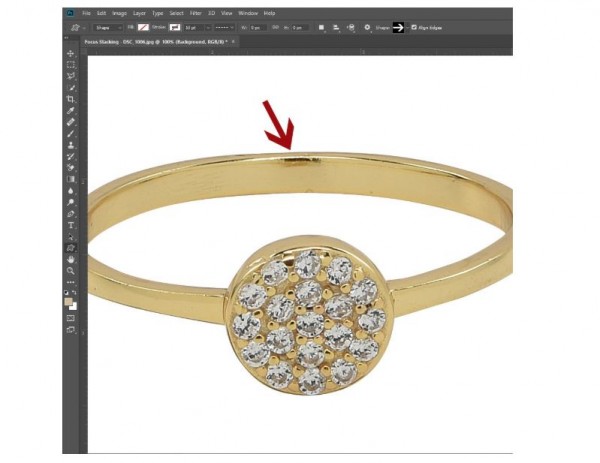
Don’t you want a life-like image? An image that attracts potential customers. Obviously, who doesn’t want that? Image clipping is a technique to remove the background of your image, making it alluring. It is a technique to enhance the frame. It is one of the most widely used tools for e-commerce websites and market place.
Due to its widely employed in market places, therefore, we recommend this tool as an essential part of product photo editing. The most beneficial feature that makes it a necessary tool is that by removing the background, the product can be easily focused.
Another essential feature is that we enter additional external information. It could be information about the picture, such as layer masks or vector paths that can be used later. On marketplaces like Amazon and eBay, it is required to submit the image of the product on a white background.
The background removal also makes your colors vary that allows your product to pop. Whenever considering to edit your product image, draw your budget online, so you always have the option to use paid tools for better compliance.
The complexity of an image determines the time frame, in which the image needs to be clipped because as beautiful the editing is performed as better the results.
Color Correction
The color contrast is such an important that you can never ignore. Even though you have a strong color background, but color correction should always be used to provide more uniformity and perfect color contrast.
The whole point of having product photo editing is to attract potential clients to click through. For this, color correction is a must as it provides a natural flair to your product, making it lively. Don’t even ignore the final tiny touch-ups as they have the potential to make your image outshines others.
Is Outsourcing Your Work a Good Idea?
With the outbreak of freelancers on different platforms. Freelancing has captured the online market. Each and everyone with even a little skill is freelancing. Not only large companies outsource specific tasks but also small ones are doing it for many years now. This tempts us to look towards this option too.
However, this is not always fruitful. But the figures have shown that outsourcing your work can take you leaps and bounds. The only drawback of outsourcing your work is the budget constraint. Otherwise, it’s always an excellent option to be at least considered because of growing freelancer fraternity, quality, and trustworthy work.
How Long Does It Take to Edit Product Pictures?
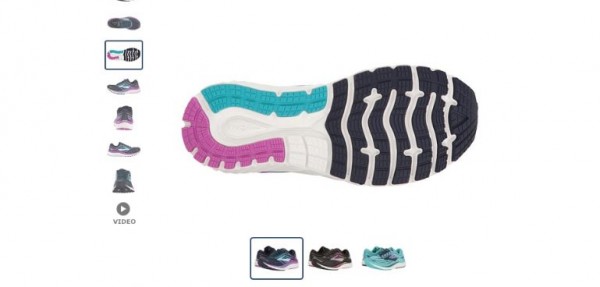
One survey shows that 73% of potential customers want to see 3 product images, at least. This shows the importance of product photos in the marketplace. While if appropriately edited, then the sky is the limit. Therefore, most people frequently ask if product photo editing a time-consuming process.
It depends upon some factors like the quality of the image or the software used for editing. According to different surveys, it takes about 5-10 minutes to edit a single picture, if you have the expertise. However, some pro editors can take about 30 minutes to edit a single photo, but the results are near to perfection.