
The HUAWEI FreeBuds Pro 4 has arrived, promising an unparalleled audio experience in a sleek package. This latest iteration comes packed with innovative features that target audiophiles and casual users alike. Whether it’s the advanced dual-driver technology, robust active noise cancellation, or superb call quality, these earbuds aim to impress. Let’s take a closer look at what sets the FreeBuds Pro 4 apart, from its sound quality to its design and usability.
How Does the Sound Quality Stand Out from Premium Earbuds?

Dual-Driver Technology for Rich Sound
HUAWEI has integrated an advanced dual-driver setup in the FreeBuds Pro 4, consisting of an 11 mm dynamic driver and a planar diaphragm driver. This combination ensures a full-bodied sound profile, delivering deep bass and detailed highs. Audiophiles will appreciate the precision and richness, whether they are listening to classical, rock, or electronic music. The dynamic driver is responsible for those punchy low frequencies while the planar diaphragm adds clarity and texture to the mids and highs. This results in a balanced sound that can adapt to various music genres effortlessly.
Active Noise Cancellation and Transparency Mode
One of the standout features of the FreeBuds Pro 4 is its advanced active noise cancellation (ANC). Utilizing multiple microphones and sophisticated algorithms, ANC significantly reduces surrounding noises, allowing you to immerse yourself fully in your music or podcasts. Moreover, the transparency mode can be activated with a simple touch, enabling you to stay aware of your environment without removing the earbuds. This mode is especially useful in busy settings like airports or cafes.
Voice Call Quality with Noise Cancellation
The voice call quality of the FreeBuds Pro 4 is enhanced by noise-canceling technology designed to filter out ambient sounds. This makes calls clearer and allows for more natural conversations, even in noisy environments. The bone acoustic sensor and a combination of other sensors work seamlessly to pick up your voice accurately while minimizing external disruptions. This ensures that your calls remain crisp and clear, making these earbuds a reliable choice for both professional and personal calls.
What Are the Design and Build Features of the FreeBuds Pro 4?
Comfort and Fit: Is it Suitable for Long-Term Wear?
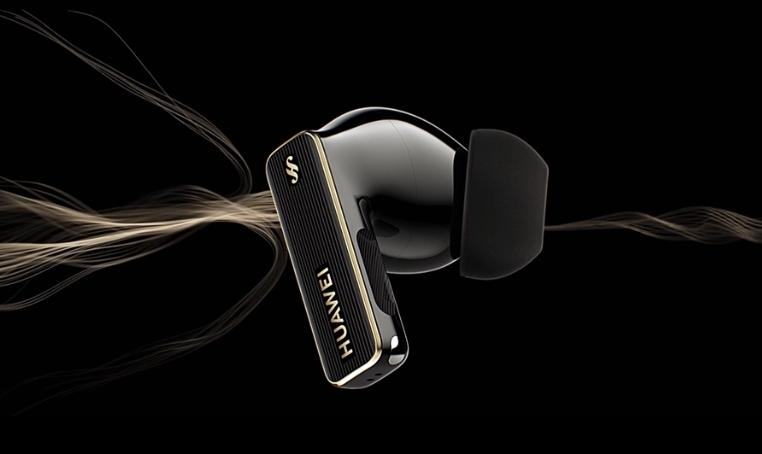
The HUAWEI FreeBuds Pro 4 has been crafted with comfort in mind. Each earbud is lightweight, weighing approximately 5.8 grams, making them suitable for prolonged use. They’re designed to fit snugly without causing discomfort, and the various silicone tip sizes included ensure you can find your perfect fit. Whether you’re working out, commuting, or just relaxing, these earbuds promise to stay secure and comfortable throughout the day.
Durability and Water Resistance
Durability is also a key focus of the FreeBuds Pro 4. The earbuds come with an IP54 rating, making them resistant to both dust and water splashes. This means they can withstand minor exposure to water and dust, although it’s recommended to avoid using them in extremely wet conditions. The charging case, however, does not share this water resistance rating, so it should be kept dry to avoid damage.
Size and Portability: Ideal for Travel?
The compact dimensions of both the earbuds and the charging case make the HUAWEI FreeBuds Pro 4 highly portable. Each earbud stands at 29.1 mm in height and the charging case at 65.9 mm wide, ensuring they can easily fit into pockets or small bags. This makes them an excellent companion for travel, as they don’t take up much space while providing top-notch audio quality and connectivity on the go.
What Are the Highlights of the HUAWEI FreeBuds Pro 4?
Seamless Connectivity with Huawei Devices
HUAWEI FreeBuds Pro 4 is optimized for seamless integration with other Huawei devices. With Bluetooth 5.2 compatibility and the Pop-Up Pair feature, these earbuds pair quickly and maintain stable connections. The ability to connect to two devices simultaneously ensures that you won’t miss calls or notifications, whether you are using a phone, tablet, or laptop.
Touch Controls and Customization
The touch controls on the FreeBuds Pro 4 are highly intuitive, allowing you to play/pause music, answer calls, and activate ANC with simple gestures. Users can customize these controls via the Huawei app, tailoring functionalities to match personal preferences. This level of customization makes the FreeBuds Pro 4 an adaptable accessory, enhancing user experience significantly.
Advanced Audio Technologies for Audiophiles
For audiophiles, the FreeBuds Pro 4 delivers a rich audio experience through various technologies like digital cross-over and Triple Adaptive EQ. These features adjust the audio output in real time based on your environment and listening preferences, ensuring an optimal sound experience at all times. Whether you’re prioritizing sound quality or looking for enhanced call performance, these advanced technologies ensure superior audio delivery.
How Long Does the Battery Last in the HUAWEI FreeBuds Pro 4?
Battery Life with ANC On vs Off
Battery life is another area where the HUAWEI FreeBuds Pro 4 excels. With noise canceling disabled, you can enjoy up to 7 hours of music playback on a single charge, which extends to 33 hours with the charging case. Activating noise cancellation will reduce this to approximately 5 hours per charge and 23 hours with the case. This excellent battery performance ensures that you can enjoy music and calls throughout the day without frequent recharging.
Charging Time and Methods: USB-C vs Wireless
The earbuds require about 40 minutes to fully charge within the charging case. The case itself takes around an hour to charge via a USB-C cable and about 150 minutes using wireless charging. The convenience of multiple charging methods ensures that you can power up your FreeBuds Pro 4 efficiently, whether you’re at home or on the go.
Conclusion
The HUAWEI FreeBuds Pro 4 stands out as a top-tier option for users seeking premium sound quality, innovative design, and reliable functionality. From its advanced dual-driver technology and active noise cancellation to its comfortable, durable build, these earbuds are designed to impress. With excellent battery life and seamless connectivity, the FreeBuds Pro 4 is ideal for both casual listeners and serious audiophiles. If you’re in the market for high-quality earbuds, the HUAWEI FreeBuds Pro 4 deserves serious consideration, especially with the ramadan 2025 deals that offer great savings.