
The mobile industry is one of the fastest rising industries in the world today. In just half a century, the number of mobile devices sold and used has surpassed the human population. In response to this expansion, a lot of people have chosen to gamble in this industry to achieve a lifetime success. In fact, they might have come to the right place.
The success stories of the mobile developers of sensing applications like Angry Birds and Interest only prove that such success can be achieved. However, the swift growth of this new jungle brings a great threat of competition not only for the newbies but even for the experienced developers.
Thus, in order to become successful, every developer has to do his job well. And, being well does not only mean being good, smart or creative. More especially, a developer has to be very accurate and economical, to save time and resources. So, there is virtually no room for mistakes for every developer. Otherwise, he will surely be beaten by many competitors or even get fired immediately. To prevent this, every developer, newbie or expert, must know these top development mistakes that jeopardize many mobile developers.
1. Planning for too many mobile platforms
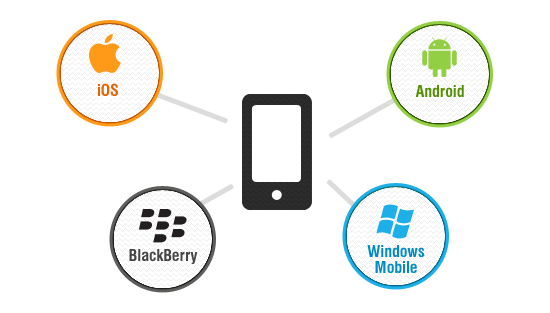
In planning to develop a mobile application, a developer needs to choose which platform to use for his app. Even if he wishes to conquer all platforms and captivate every customer with his dream app, he cannot just do that with a single new app. Otherwise; much time will be wasted and spent just to develop his first untested version of his dream app. And with this time spent, new platforms and new developers can take over the market. So, instead of trying to be a jack of all trades and master of none, why not focus to develop on one platform first? Then when the app is fully developed, he can move on to making another version for different platforms. And to save even more time, the developer must wisely choose which platform to use. To do that, he must consider these decisions. First, is he comfortable with developing in his chosen platform? Then, is the prominent platform in the market? With these two questions in mind, one can develop a program with less time, less cost and with good popularity.
2. Starting out with the codes first

Coding is essential in designing and developing mobile applications. However, something is more important than the codes first. That is, the App itself! So, before you proceed with coding, make sure you have a complete idea of what your app will do and will look like. Go into details and possible problems with the design first. Then, with good design and function, you can proceed to coding every single detail of your plan. Then test until you are fully satisfied. You can actually save time with such a plan because you already know what specific codes to use. And you can get fewer errors because you have already anticipated them in your plan.
3. Bad design for User Interface

Intuitively, we know that a mobile application demands a good user interface because mobile devices are visual tools. It must be visually appealing, simple and complete. Every detail must be considered in order to improve the user’s experience. Also, the design must be easy to understand for the end users because no matter how good a developer wants it to look; the popularity of the app depends on the users. Sometimes, the simpler a design can be; the better. Even with all the details, an app with fewer buttons to click and options to choose will not only be easier for the user to understand and use, but will also use up less resources from the phone and will make it easier for the program to load. All these add up to better user experience and then, popularity.
4. Designing to multitask

There are many reasons why people buy apps and of course, these reasons are personal. But what a developer must consider is that a person will buy an app only for a specific purpose. They don’t need an app which has too many functions especially those which are not even related. So, the developer must limit the app and narrow down to its best functions, a function that will absolutely attract consumers. This follows with the earlier guide to keep the app simple. It gives the developer focus – to settle on developing one or a few functions and then optimize the app until it becomes the best in its line. Not only does this give the app an edge in the market, but will also give the developer an edge since it will make him spend less time than developing a multitasking app with poorly developed functions.
5. Relying on a device’s specific feature

An app must never be designed for specific devices only. It must run for every device with the chosen platform. This makes sure that the app becomes available for more users. The problem with being specific to a single or a few devices is that developers tend to depend too much on the device’s features, built-in tools and accessories. Thus, preventing the app to function well on another device, and lowering its consumer base. So, to prevent this, one must remember to go back to basics. Do not rely on features that are only available on few devices, nor on plug-ins that need to be downloaded along with the app itself. This will not only keep the app simple, but will make it marketable to every user of the platform.
These are only a few of the mistakes experience of many developers, newbie or experienced. Preventing these mistakes will help to develop more effectively and efficiently but it will not guarantee instant success. It will only make one a better developer, well ahead among the others, closer to achieving success.