
If MP3 Rocket is not working for you, it’s time to check out some alternatives.
Why Turn to MP3 Rocket Alternatives?
While MP3 Rocket is one of the best applications for downloading .mp3 files from YouTube, we have received complaints of the app failing on most Windows 10 devices after the latest system update. MP3 Rocket has a built-in feature of sieving copyright music on YouTube so if your application is unable to fetch a particular .mp3 file, it’s probably got to do with the app’s filtering system. The user interface is easy to navigate and all those buttons are placed right where they are supposed to be. We haven’t had any compatibility issues yet with .mp3 files downloaded using MP3 Rocket.
Did you know that MP3 Rocket can also be used for crafting ringtones?
MP3 Rocket has a built-in media player to get the music going as soon as they are downloaded! Music and videos are just a click away in MP3 Rocket’s interface. Simply type in the song’s name hit ‘Enter’ and you are good to go!
MP3 Rocket Alternatives: Which is the Best Alternative?
For those who had an expensive headset from Beats or JBL and wanted to listen to some high bit rated music, MP3 Rocket won’t be the right choice because it cannot save high bit rated (I’m not sure if that’s what it’s called) music files.
MP3 Rocket can only fetch music files of bit rate 256 Kb/s or lower.
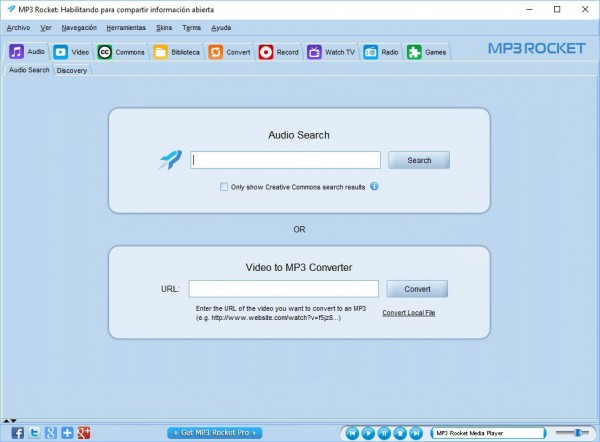
On the other hand, not all of your links will be resolved by MP3 Rocket. The software’s official website went out of bounds a long time ago and hasn’t been restored yet. In case you get errors and encounter app failure, you will have to scour through forums on Reddit to figure out whatever’s wrong with your app because there is no official support.
Don’t forget to check this out! How to Save WhatsApp Status? Use ‘Status Saver and Cleaner for WhatsApp’!
There are lots of things to worry about, aren’t there? Not if you install one of these MP3 Rocket substitutes:
Jihosoft 4K Video Downloader
Want to download an entire gym playlist from YouTube? Jihosoft 4K Video Downloader got you covered! This app can process multiple links at once and download the entire video/audio catalog without you having to copy and paste the link for every item in that playlist.
Apart from downloading 4K videos and high quality .mp3 files, this app can also fetch MOV, AVI, MKV, FLV (and any other fancy-sounding audio/video format) off YouTube, Facebook, Twitter, Instagram, and other amazing websites (Yeah! I tested and they all worked ????).
Browser-Based MP3 Rocket Alternatives
Youtube Video and Audio Downloader
This one’s an extension for Mozilla Firefox Web Browser and available across all platforms that support Firefox. However, there are a few crippling limitations in this extension including the inability to save audio files in .mp3 format (only .m4a or.webm format are currently supported). Keep in mind that installing many extensions can have a significant influence on your browser’s performance.
Keepvid Works
Just as the name suggests, this website works like a charm!
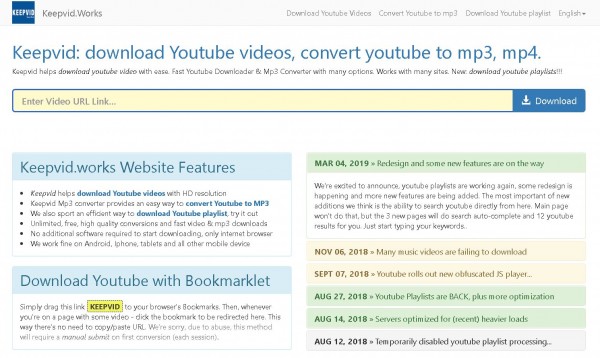
You don’t need to install anything on your system for accessing and downloading content via this website. Keepvid Works can be accessed using any device that has a web browser built-in. Head to Keepvid Works and start saving those videos to your hard drive in no time!
For devices that don’t support saving contents to internal storage (Xbox One and PS4, for instance), Keepvid Works didn’t work!
MP3FY
MP3FY is also a web-based audio and video downloading tool that can be used on any device with a web browser. Simply have the link handy for the video that you want to download and paste it in the box in front of the green ‘Convert’ button. You can also directly search in YouTube’s catalog by typing in the box. You can even access region-locked contents using MP3FY.
My Recommendation
I don’t usually download stuffs on YouTube or any other website, for that matter, because I have an unlimited broadband data plan and my plan is also not subject to Fair Usage Policy and there isn’t any tiny written term that would limit my speed during peak hours. I just stream those videos, again and again, using my ISP’s data! Otherwise, if there’s no coverage in the area I’m traveling to (I do travel a lot), I download enough content for my trip from Keepvid Works and it just works!