• Skip to main content
  • Skip to secondary menu
  • Skip to primary sidebar
  • Skip to footer
Best Free Web Resources — local AI tools and hardware guides

Best Free Web Resources

Local AI Tools & Digital Engineering Resources

What can I run?
  • AI Tools
    • Start: Local LLMs
    • Ollama Models & VRAM
    • LM Studio Models
    • GPU Comparison
    • AI Hardware Matrix
    • Local LLM Directory
    • VRAM Calculator
    • Hardware Compare
    • Local Model Recommender
    • API Pricing & ROI
  • Local AI Guides
  • Web Resources
    • Inspiration
    • Photography
    • Games
    • SEO
    • Tutorial
      • Coding
      • WordPress
    • Resume/CV
    • Graphics
      • Logo
    • Freebies

Steps to test the SMTP Server using Command Line on Telnet or by using Online Tools

March 30, 2017 by Rupesh Kumar

SMTP or Simple Mail Transfer Protocol is used as the backbone for sending and receiving mails over the internet. SMTP does the needful and you it acts as a carrier to send and receive mails. This is highly convenient as you do not have to worry about the underlying protocols, commands etc. as you have the SMTP server to take care of it.
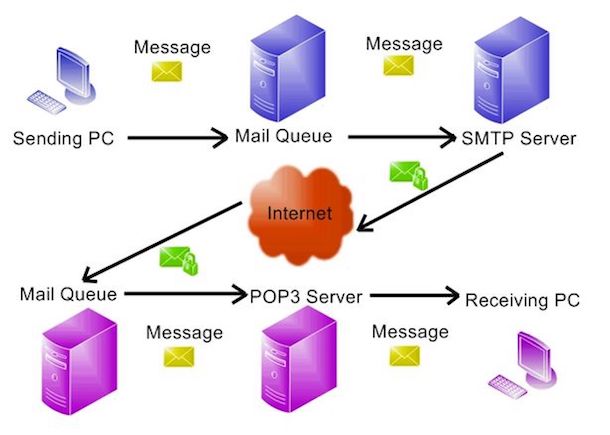
To check the proper working of a SMTP server, you can make use of telnet and know if the server is functioning the way it has to, if there are any blocks in communication, relay of mails to a particular domain, commands supported by the server, the response time and the identification of hostnames.

Testing using Telnet sessions

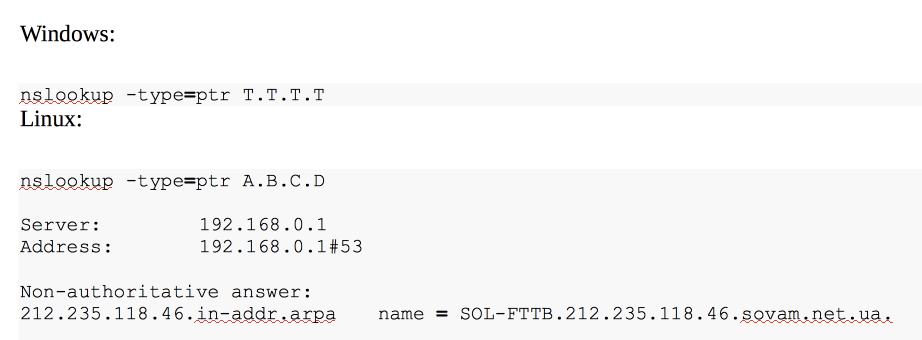
A verification of the telnet client is mandatory and after this, you will have to search for the mail server to which you wish to login. There are commands such as nslookup to do the same. Also, you will need the DNS PTR for the IP you wish to use. If you wish to know your IP, you can Google for it as there are various websites that do the needful.

Please check the below screenshot to run the command for both Linux and Windows:
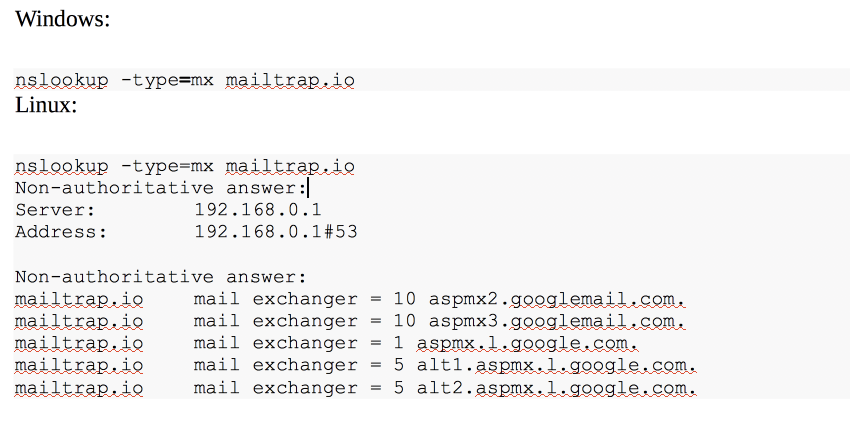
Find more examples on https://mailtrap.io/blog/2016-07-26-how-to-test-smtp-server

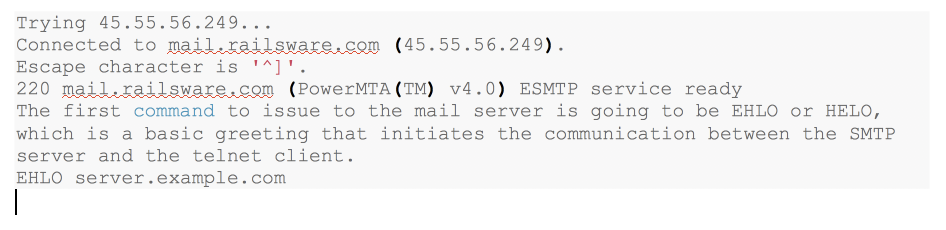
The necessary requirements are to know the MX record and PTR for IP which will enable you to login to the SMTP server. When you login, you might see the following code:

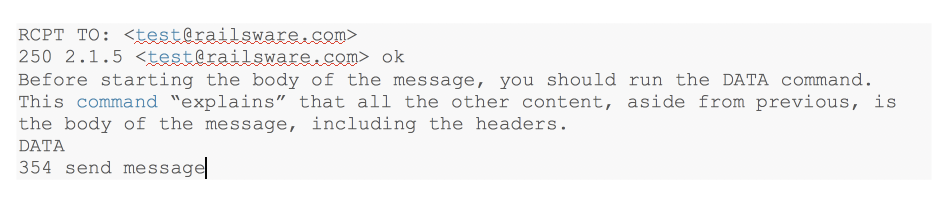
You will have to type the MAIL FROM command and this will show the address to which all e-mail bounces get delivered. Also, you can send the RCPT TO command after sending to MAIL FROM command to assess where the mail heads to.

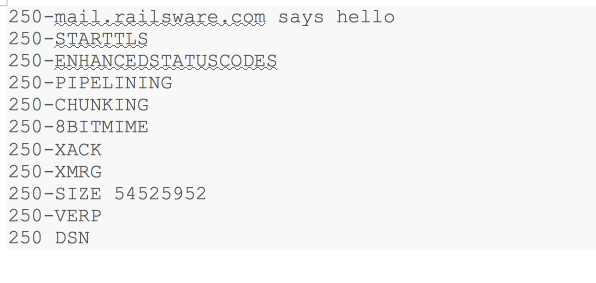
There are certain servers that also support PIPELINING. Under such conditions, the server will wait until DATA command is received before it responds to any command following EHLO.

Testing SMTP Servers using Online Services

To start with, you will have to define the SMTP server address and it includes several tasks in testing such as DNS Black List status, MCX records, relaying configurations, PTR Record and the verification of e-mail address. Listed below are some online services to test the SMTP servers:

  1. MX Toolbox

It is a free toolbox which offers limited number of tests and checks if the reverse DNS has a mismatch, if the hostname is valid, checks for the banner, TLS, connection time, open relay and transaction time.

  1. Wormly

This gives you a free trial to check the SMTP server. However, you cannot define the ports yourself and the connection used is not secure.

  1. SMTPer

This is one of the best solutions available as you can define ports, users and also use a secure connection.

  1. Test-smtp.com

You can use this online service to test for relays. However, it does not serve as a proper online tool.

  1. tcsoftware.net

Although this does not provide a secure connection, it allows you to test for MX, DNS black list, verification of e-mail address, PTR record and relay configuration.

⚡ Free Interactive Tools

Work out what your hardware can actually run

Free calculators and directories, sized from real model weights — before you download gigabytes or order a card:

🚀 Start: Local LLMs Hardware, runner and first model 📊 What Can I Run? Models by VRAM tier, 8GB–128GB 💻 Hardware Matrix 75 laptops & GPUs profiled ⚡ VRAM & KV Calculator Weights, cache and overhead

Filed Under: Technology

About Rupesh Kumar

Rupesh Kumar founded Best Free Web Resources in 2010 and edits the site. He writes about free web resources, web development and running open AI models locally. Learn more: About BFWR & our editorial standards → · Follow on X (@bestfreewebres) →

Primary Sidebar

⚡ FREE INTERACTIVE TOOLS

Local AI Hardware & VRAM Matrix

Benchmark your PC or Mac for local AI, calculate VRAM requirements, and compare cloud API costs vs local hardware ROI.

🚀 New here? Start with Local LLMs → 💻 Hardware Matrix (75 Devices) → 📚 Local LLM Directory (30 Models) → 🎮 AI GPU Comparison → ⚡ VRAM & KV Cache Calculator → 💰 API Pricing & Break-Even → 🍎 Mac VRAM Unlocker (90% Boost) →
📦 Ollama 🖥️ LM Studio ⚙️ llama.cpp 🚦 vLLM 💬 Open WebUI 🎨 ComfyUI 🔒 Self-Hosted 📊 VRAM Tiers 🎯 Recommender ⚖️ Comparisons

Search

  • Facebook
  • Instagram
  • RSS
  • Twitter
  • YouTube

Footer

Latest Guides

  • Two 16GB Graphics Cards Can Be 3.3x Apart for Local AI
  • AI Upscale Models in 2026: Which Still Ship, and Which You Cannot Sell
  • ControlNet Models in 2026: Which Ones Still Ship, and What They Weigh
  • Stable Diffusion LoRA: Matching the Base Model, Weights and Stacking
  • Stable Diffusion Image Editors in 2026: Which Ones Are Still Maintained
  • ComfyUI Templates in 2026: 660 Built In, and Half Need the Cloud

AI Tools & Calculators

  • What can I run?
  • VRAM Calculator
  • GGUF Size Calculator
  • Fine-tuning VRAM
  • LoRA Training VRAM
  • Image Generation VRAM
  • Mac VRAM Optimizer

Browse & Compare

  • Models Directory (30 models)
  • Hardware Matrix (75 devices)
  • Image Models
  • Model Licences
  • Comparisons
  • Model Recommender
  • API Pricing & ROI

Guides & Resources

  • Technology
  • Coding
  • Tutorials
  • Freebies
  • Graphics

Copyright © 2026 · Best Free Web Resources · All Rights Reserved.  |  About · Privacy Policy · Contact · AI Tools Hub