
Online business are booming and there are is one thing that saves entrepreneurs from the complexity of building a website from scratch.
Wix website builder is an online platform, where you can just do that — build a website from scratch, but without entering a single line of code. Yes, you heard it right.
If you are not new to the online world, you would have also known other similar services such as Squarespace. Weebly or Jimdo.
But, out today’s focus is Wix.com and how it helps businesses across the world. According to new reports, Wix total customer base has crossed 50 million users and the number of staggering signups each day is 45,000 per day.
To make things more interesting, Wix is now a team of more than 900 strong and committed people. Until now, the platform is used to create 60 million websites over the world.
Statistically, there is nothing wrong with Wix, but there is more that meets the eye.
We will go in depth of how Wix works and feels and consider answering the question whether it is the perfect platform for you or not.
Wix Review

The platform is utilized by many different people including new businesses, photographers, environment lovers, bloggers and more. So, what make it so special? Let’s go through the features that spark value to the platform.
More than 600+ Ready Made Templates to Choose From
The word templates signify a ready-made website that can be used as a starting point for your project.
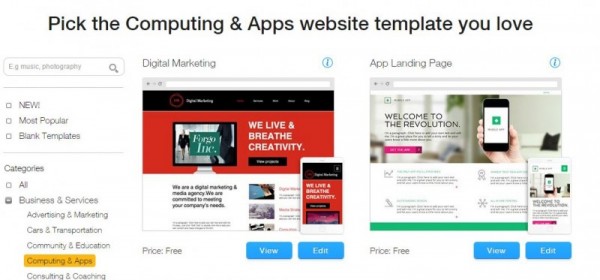
The templates are designed with utmost care and look like someone coded them in. But, that’s not true as all the templates are made with the help of the Wix Editor.
In simple words, there is no limitation to the websites you can create. The pre-made templates are categorized so that you can get started as quickly as you can.
Build Yourself -Intuitive Drag and Drop Interface
The interface of the Wix Platform is quite good. It might feel cluttered in the first look, but with time you can get the hang of it. The interface completely drag and drop and there is no need to write a single line of code.

The HTML editor consists of tons of elements. There can be image selection, text and another form of great elements, needed to build a web page of value and design.
The complexity is a blessing in disguise. There is more to control and more to add. Without the complexity, it would not have been possible.
Great Support Team
I have always believed the fact that a service worthiness depends on the how good the support is. The support plays a vital role in the user experience and without a proper support even great products fail and perform poorly.
The statistics can give you a hint on how great is the support of the Wix team. They are available through email or phone. The free version sadly does not offer any support. If you are looking for support, you need to get a premium package.
Currently, there are an eCommerce package, Unlimited package and Combo package. Visit the pricing page for more detail.
Other features Worth Mentioning
- The platform supports eCommerce but does not expect more from the platform when it comes to creating a complex eCommerce website, Wix is not the platform you choose.
- Search Engine Optimization is supported by the platform. So, if you are looking for basic search engine optimization, this will surely help.
- Monetization can be done through Wix app market.
- There are tons of apps available to be integrated with the website. The apps improve the functionality of the website and hence make it useful for many ideas.
- It supports visitors statistics for better understanding of demographics.
- Forums can be added using the app.
- Domain is provided with premium packages. With a domain, storage space is provided as well. It depends on which package you are using.
- Newsletter tool embedded within the Wix platform, known as ShoutOut, enables you to reach your subscribers using the newsletter. A great marketing tool at the exposure of the businesses.
- Different pages can be password protected. This way you can set different level of customization anytime and send information to only selected readers if needed.
Should you go for it?
If you are using the platform for getting your business online without spending tons of money on web development and other time constraints, then Wix is a great platform for you.
It offers drag and drop filter, improved app support and basic features such as SEO, Newsletter, and other features.
But, if you are making a customized app with complex business logic, Wix is just not for you. You are better off developing from custom and improving the platform in quick succession for better growth compared to Wix.
So, what’s your stake on Wix? Comment below and let us know.
Also, share the article as much as you can.
Overall Rating: 4.2/5