
Xnspy is a smartphone monitoring app that can remotely monitor internet, social media and various other logs off a smartphone or tablet. Though XNSPY is smartphone monitoring app designed to monitor kids and employees, you can also use it as a spouse spying tool.

Let’s find out what else this app can do.
What can XNSPY do for you?
XNSPY is a software that you can download on any Android device running Gingerbread or above. The app can monitor, track, and manage a cell phone or tablet due to its varying set of features. With it’s app blocking, social media tracking and remote controls, it’s quite understandable if people are compelled to use this app, even if they don’t really need it for some valid monitoring purpose.
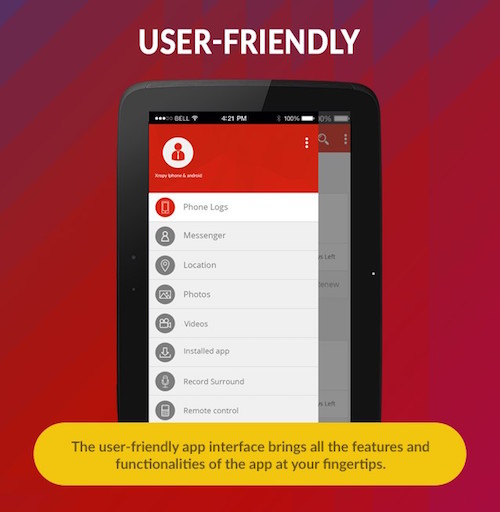
There are three main users of this app:
- Employers: XNSPY looks at device security from another perspective, apparently. The intuition behind the app is that monitoring can help businesses by limiting employees’ access to apps and websites with compromised security protocols. For example, if an employer is worried about his staff downloading and using third-party apps with shabby security, they can use xnspy’s Android spy app to ensure nothing like this happens.

- Parents: Those who are tired with their kids’ online obsession, poor school performance and late night sneakouts can use this app to monitor and manage their kids’ online and offline activities.

- Spouse: When infidelity seems like a possibility, partners use secretive monitoring apps to have a categorical know-how rather than posing any allegations. XNSPY has many features that are useful for spouse monitoring too.

Features
We will follow up with what we said earlier about the features of this app. So this is what you can do with using Xnspy.
- Manage
XnSpy has a set of device management features that include remote controls and App blocker. The Remote Control allow you to take a screenshot off a device, block phone access, wipe phone storage and even record calls and surroundings (That’s actually a lot of stuff you can do!). The App Blocker allows you to to restrict your target users from accessing apps as per your discretion.
- Monitor
If you don’t want to proactively participate in how a person use their smartphone, you can also use this app just for overseeing someone’s cell phone activity. XNSPY has lots of monitoring features. For example, you can monitor all kinds of phone logs like calls, Text, emails, internet browsing history, calendar entries, contacts etc. Then, you can also use this app to monitor social media of a person. Xnspy can take leads on WhatsApp, Facebook, Instagram, Viber, Line, Skype, Kik, iMessage and Tinder. You can access chats, photos, videos, and audio recordings from these apps, depending on the type of content they support.

- Track
Use XNSPY to track a person’s real-time location or get access to the location history logs. The app also uses geofencing to make it possible for you to get notified when a person enters or leave a certain “geofenced” location.
- Miscellaneous
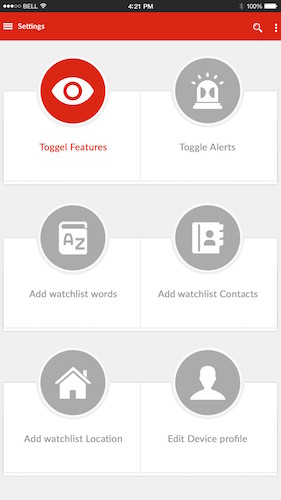
To ensure that you get information about the activity off others’ device in time, Xnspy’s Android spy app has watchlist alerts where you can enter all the words, contacts and places to get instant notifications on their use. “Watchlist Locations” can be used to prevent your kids from entering dangerous neighborhoods, pubs and discos, while “Watchlist words” can help parents keep tabs on suspicious and abusive words. If there is any precarious person you don’t want your child to contact, use “Watchlist Contacts” for this reason.
Compatibility
XNSPY is compatible with all Android device running Gingerbread 2.3 or higher.
Why use XNSPY?
Technology has its pitfalls—security breaches, breakdowns, malware, viruses, etc. Alienation is not a viable solution, so we need something else to take care of the risks of going online. We have antivirus, firewalls and dozens other software to prevent outsiders from scavenging on our systems. But these aren’t foolproof plans to keep our computers, cell phone and tablets secure.
What’s viable is to take control of the content that’s stored on our electronic devices. No corporate information should be stored on the company-provided phones, or no third-party apps should be allowed to use at workplace, and so on. XNSPY can be used to monitor devices at work the way aforementioned. Parents can also use the app to keep their kids safe from the internet abuse.
If you are looking forward to use spy apps for android, you can save a lot with Xnspy’s packages that start at $8.33/month.
What we liked:
- Affordable app and multi-monitoring features
- Easy to use
- Extensive social media monitoring
- Accurate GPS tracking and geofencing
- Remote commands are powerful
What we didn’t like:
- App blocker is very basic (no option to block individuals apps and no app block scheduling)
- No Snapchat monitoring (it’s tweens and teens’ favorite app)
Work out what your hardware can actually run
Free calculators and directories, sized from real model weights — before you download gigabytes or order a card:
