
• Skip to main content
  • Skip to secondary menu
  • Skip to primary sidebar
  • Skip to footer
Best Free Web Resources — local AI tools and hardware guides

Best Free Web Resources

Local AI Tools & Digital Engineering Resources

What can I run?
  • AI Tools
    • Start: Local LLMs
    • Ollama Models & VRAM
    • LM Studio Models
    • GPU Comparison
    • AI Hardware Matrix
    • Local LLM Directory
    • VRAM Calculator
    • Hardware Compare
    • Local Model Recommender
    • API Pricing & ROI
  • Local AI Guides
  • Web Resources
    • Inspiration
    • Photography
    • Games
    • SEO
    • Tutorial
      • Coding
      • WordPress
    • Resume/CV
    • Graphics
      • Logo
    • Freebies

RGB Fans Introduction

September 4, 2019 by Rupesh Kumar

Gaming computers are nowadays very famous among young, old, elders or you can say in every age. These gaming computers need some extra care because they are working on a high clock rate and they also have many sensitive, and much expensive part then a regular pc that can be damaged if they heat up.

So to prevent their overheating problem you can use RGB fans in your gaming PC. These RGB fans will help you to reduce your computer temperature. You can also use different RGB fans to add more beauty to your beast.
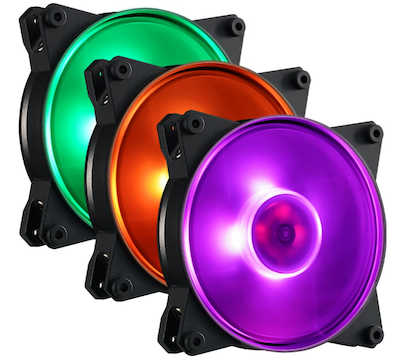
So with this, you can get more lights inside of your PC that looks amazing. Most of the gamers nowadays used PC builder RGB fan case. Here we try to give you a brief description of RGB fans use in you gaming pc. You can also read complete comprasion about RGb fans here https://toolsmesh.com/best-rgb-fans/

RGB fans are available in different size like 120mm, 140mm. Different size of RGB fans is design for a different PC case. So first thing you need to check the size of your RGB fan case that fits into your PC. Mostly latest system used 120mm fans case.

But in case your system is an old model then you need to check first. These fans are designed according to the PWM that is known as Pulse-width-modulated. This function helps to make airflow of your pc batter and reduce pc temperature.

PWM basically control the fan speed according to the temperature of pc if PC temperature is increased then it will increase the speed of fan if the temperature is low it will decrease the speed. In this way you PC temperature become normal.

PC airflow is also can be measured by the CFM cubic feet per minute. In simple words its volume of airflow in per cubic feet that are moved by the fan in one minute. So you can also check the CFM of the fan before deciding what is better for you. Increase in CFM number increases the airflow and gives you batter performance ins some case.

So its the internal structure that how RGB fans work now let’s talk about their outer look. Gamer PC work fast with the help of these fans but these fans also add more beauty to your PC. Their lighting tone makes your PC more glowing up.

Mostly these fans are designed for batter airflow with airflow they also consider beauty to add into your PC. Lighting in the RGB fans makes is more inspiring. So you can also add RGB fans add some owsum look into your PC inside.

The noise of RGB fans is also considerable things low noise fans is one of the main factor that makes your PC cooler than noisy fans, Some times it makes more noise because of its damage barring so check this thing properly as well.

Filed Under: Games

About Rupesh Kumar

Rupesh Kumar founded Best Free Web Resources in 2010 and edits the site. He writes about free web resources, web development and running open AI models locally. Learn more: About BFWR & our editorial standards → · Follow on X (@bestfreewebres) →

Primary Sidebar

⚡ FREE INTERACTIVE TOOLS

Local AI Hardware & VRAM Matrix

Benchmark your PC or Mac for local AI, calculate VRAM requirements, and compare cloud API costs vs local hardware ROI.

🚀 New here? Start with Local LLMs → 💻 Hardware Matrix (75 Devices) → 📚 Local LLM Directory (30 Models) → 🎮 AI GPU Comparison → ⚡ VRAM & KV Cache Calculator → 💰 API Pricing & Break-Even → 🍎 Mac VRAM Unlocker (90% Boost) →
📦 Ollama 🖥️ LM Studio ⚙️ llama.cpp 🚦 vLLM 💬 Open WebUI 🎨 ComfyUI 🔒 Self-Hosted 📊 VRAM Tiers 🎯 Recommender ⚖️ Comparisons

Search

  • Facebook
  • Instagram
  • RSS
  • Twitter
  • YouTube

Footer

Latest Guides

  • Two 16GB Graphics Cards Can Be 3.3x Apart for Local AI
  • AI Upscale Models in 2026: Which Still Ship, and Which You Cannot Sell
  • ControlNet Models in 2026: Which Ones Still Ship, and What They Weigh
  • Stable Diffusion LoRA: Matching the Base Model, Weights and Stacking
  • Stable Diffusion Image Editors in 2026: Which Ones Are Still Maintained
  • ComfyUI Templates in 2026: 660 Built In, and Half Need the Cloud

AI Tools & Calculators

  • What can I run?
  • VRAM Calculator
  • GGUF Size Calculator
  • Fine-tuning VRAM
  • LoRA Training VRAM
  • Image Generation VRAM
  • Mac VRAM Optimizer

Browse & Compare

  • Models Directory (30 models)
  • Hardware Matrix (75 devices)
  • Image Models
  • Model Licences
  • Comparisons
  • Model Recommender
  • API Pricing & ROI

Guides & Resources

  • Technology
  • Coding
  • Tutorials
  • Freebies
  • Graphics

Copyright © 2026 · Best Free Web Resources · All Rights Reserved.  |  About · Privacy Policy · Contact · AI Tools Hub