
• Skip to main content
  • Skip to secondary menu
  • Skip to primary sidebar
  • Skip to footer
Best Free Web Resources — local AI tools and hardware guides

Best Free Web Resources

Local AI Tools & Digital Engineering Resources

What can I run?
  • AI Tools
    • Start: Local LLMs
    • Ollama Models & VRAM
    • LM Studio Models
    • GPU Comparison
    • AI Hardware Matrix
    • Local LLM Directory
    • VRAM Calculator
    • Hardware Compare
    • Local Model Recommender
    • API Pricing & ROI
  • Local AI Guides
  • Web Resources
    • Inspiration
    • Photography
    • Games
    • SEO
    • Tutorial
      • Coding
      • WordPress
    • Resume/CV
    • Graphics
      • Logo
    • Freebies

3 Tools and Resources Every App Developer Needs to Know About

March 29, 2018 by Rupesh Kumar

To smartphone users, it may seem as if new apps appear out of thin air and that they magically work properly the moment they appear. You know app development, so you know better than anyone how much time and effort go into creating an application.

Take some of the weight off your shoulders by using resources and tools that not only make your job easier but also help you put out the most polished product possible.

Test Your Work with Textmunk
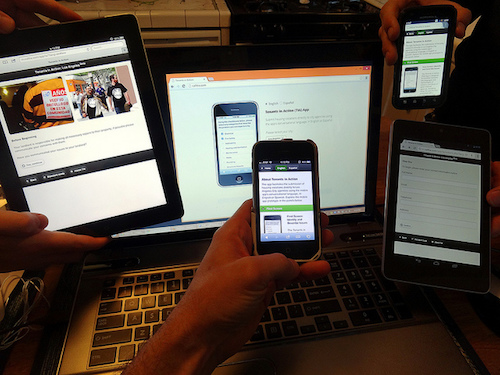
Image via Flickr by craigdietrich

Testmunk is one of the simplest but most helpful resources at your disposal as you develop your app. The number of operating systems, smartphones, and mobile devices available make Testmunk an essential tool to use as you create a new application to fulfill a need. Whether you’re designing a texting app for people to stay in touch, a fitness tracking app, or something related to music, you have to ensure that it works properly across all platforms. Otherwise, you’ll end up with bitter Android users or angry iOS fans who can’t use what you’ve developed.

Rather than constantly checking the way your app performs yourself or asking random friends and colleagues to test the apps for glitches, bugs, and usability, you can do everything yourself through Testmunk. The tool has come a long way since its inception. A visit to the Testmunk website reveals a page full of documentation with instructions and tutorials for everything you can imagine. It teaches you how to do a test, how to run your app on your local device, how to design for Android and iOS, and much more.

Find Your Voice with Agora

People love voice-activated apps that make their lives easier. The ability to activate an app or pull up a program simply by speaking is convenient and cool on a high-tech, sci-fi level. Smart developers who create new calling and texting apps know the value of adding voice communications and video capabilities as well.

To incorporate real-time voice options and video calling easily, use Agora’s developer portal. From there, you have a world of possibilities, including the potential to create a new voice-to-text app, a fresh way to video chat, or a combination of the two. You could come up with your own Animoji variation or simply put together a way for people to communicate no matter where they are in the world.

Design for Multiple Platforms with RhoMobile

You can’t simply design apps for Android or iOS. There are too many platforms floating around to focus on just one or two. However, coding for multiple platforms is time-consuming and often frustrating. With the help of RhoMobile, you don’t have to work as hard, but you don’t have to skimp on quality either. The resource allows you to develop native apps over an array of operating systems, yet you only have to create one code.

It takes skill to code and imagination to develop new apps. Make sure you have these three tools at your disposal to ensure seamless integration.

⚡ Free Interactive Tools

Work out what your hardware can actually run

Free calculators and directories, sized from real model weights — before you download gigabytes or order a card:

🚀 Start: Local LLMs Hardware, runner and first model 📊 What Can I Run? Models by VRAM tier, 8GB–128GB 💻 Hardware Matrix 75 laptops & GPUs profiled ⚡ VRAM & KV Calculator Weights, cache and overhead

Filed Under: Featured, Technology

About Rupesh Kumar

Rupesh Kumar founded Best Free Web Resources in 2010 and edits the site. He writes about free web resources, web development and running open AI models locally. Learn more: About BFWR & our editorial standards → · Follow on X (@bestfreewebres) →

Primary Sidebar

⚡ FREE INTERACTIVE TOOLS

Local AI Hardware & VRAM Matrix

Benchmark your PC or Mac for local AI, calculate VRAM requirements, and compare cloud API costs vs local hardware ROI.

🚀 New here? Start with Local LLMs → 💻 Hardware Matrix (75 Devices) → 📚 Local LLM Directory (30 Models) → 🎮 AI GPU Comparison → ⚡ VRAM & KV Cache Calculator → 💰 API Pricing & Break-Even → 🍎 Mac VRAM Unlocker (90% Boost) →
📦 Ollama 🖥️ LM Studio ⚙️ llama.cpp 🚦 vLLM 💬 Open WebUI 🎨 ComfyUI 🔒 Self-Hosted 📊 VRAM Tiers 🎯 Recommender ⚖️ Comparisons

Search

  • Facebook
  • Instagram
  • RSS
  • Twitter
  • YouTube

Footer

Latest Guides

  • Mac mini M6 for Local AI: Which Configuration to Buy, and Why 16GB Is Slower
  • LM Studio Bionic: What It Does, What It Costs, and What Stays Local
  • llmfit: How the Local LLM Fit Checker Works, and How Far to Trust It
  • How to Run GLM-5.3-Flash Locally: 321B, MIT Licence, and the Memory It Takes
  • Why Modern Online Slots Feel Different Even When the Basic Format Looks the Same
  • How to Run Qwen3.8-Flash-Next Locally: Memory, Speed and the Licence Catch

AI Tools & Calculators

  • What can I run?
  • VRAM Calculator
  • GGUF Size Calculator
  • Fine-tuning VRAM
  • LoRA Training VRAM
  • Image Generation VRAM
  • Mac VRAM Optimizer

Browse & Compare

  • Models Directory (30 models)
  • Hardware Matrix (75 devices)
  • Image Models
  • Model Licences
  • Comparisons
  • Model Recommender
  • API Pricing & ROI

Guides & Resources

  • Technology
  • Coding
  • Tutorials
  • Freebies
  • Graphics

Copyright © 2026 · Best Free Web Resources · All Rights Reserved.  |  About · Privacy Policy · Contact · AI Tools Hub