
Do you look for an Android booster? Have you searched and tested many app cache cleaners and couldn’t find the one for you? Well, this is same for all. Google Play is packed up with many one click optimization applications which claim to be the best and safe in its type. But the real picture is revealed only when these are tested.
To assist all users in finding one worth downloading app, we tested a few Android boosters. These apps were chosen on the basis of recommendations and reviews. Amongst all, we gave a green flag to Systweak Android Cleaner. Systweak Android Cleaner impressed us with its user-friendly functionality and smart cleaning. Everything is listed on the home screen, which makes operating less complicated. This app didn’t give us a way to think that it’s not worth. Read on and learn it.
Recommended:
Best Call Recorder For Android
Fishing Apps for Android
Systweak Android Cleaner
What does Systweak Android Cleaner do?
In the most simplified terms, this app helps your Android smartphone outstrip in its performance. It’s an app with one click functionality. These functionalities include speed booster, app cache cleaner and battery saver.
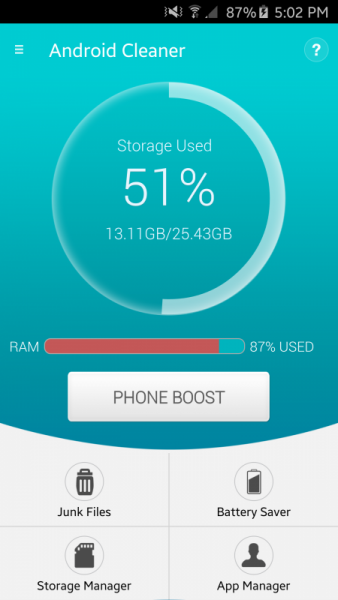
Systweak Android Cleaner optimizes phone performance and frees up phone RAM by removing junk files and managing installed app. It has to be mentioned that we tested this area with great care and so we gave this app a phone which was fully cluttered. Our phone’s speed boosted and it was free from all litter.
Features
Junk Files
We liked the fact that it accurately accumulated junk files and confirmed before deleting any of these files. This means that even if these files are of no use, Systweak Android Cleaner won’t do anything to it before gets your consent.
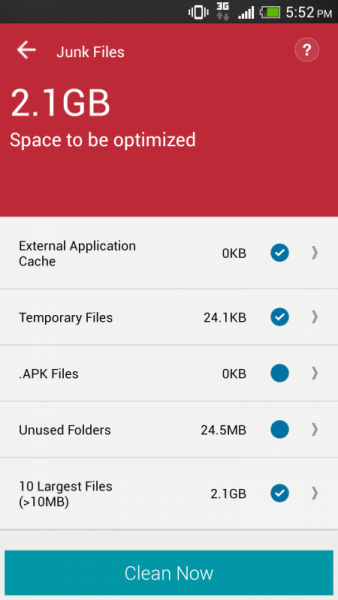
All junk files in our phone got listed under certain heads (which are shown in the picture). We could open these folders and files and see what exactly Systweak Android Cleaner was about to clean. Phew! Nothing got deleted automatically.
Battery Saver
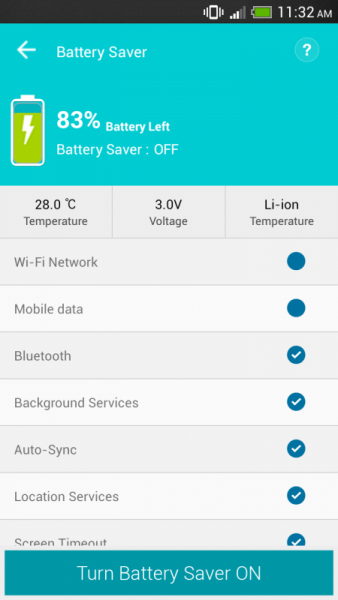
This one is an ordinary feature. As other junk file cleaner apps do, Systweak Android Cleaner too has a battery saver preference. You can turn on and off this feature and also manage the parameters on to save battery. This turned out to be a good option for us since we deselect some of these options.
Store Manager
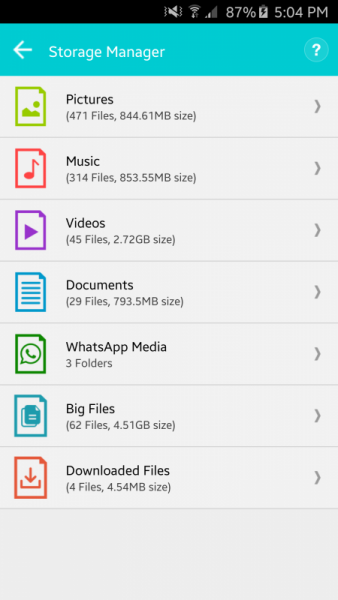
Systweak Android Cleaner’s store manager will manage your all data. This phone booster manages pictures, music, videos, document, WhatsApp media, big files, and downloaded files. This allows you to remove any file that you feel is of no use. You can open any category and delete files from it. Also, you get an option to create a backup file before deleting any of these. This backup file is created with Right Backup Anywhere app.
It every time takes a few seconds time to retrieve the data (which we didn’t like). But apart from this, we found store manager feature a good one.
App Manager
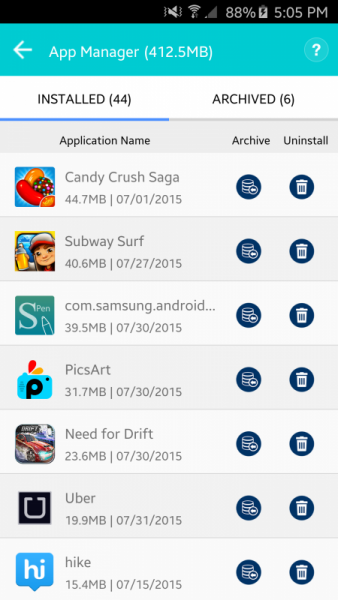
This Android booster has an app manager, which allows users to change settings and optimize the phone on the basis of the apps installed in your phone. These apps can be deleted and achieved.
What more has Systweak Android Cleaner got?
Apart from the above-mentioned settings and preferences, Systweak Android Cleaner got a few more worthwhile features. All these impressed us. It has got a scheduler, which allows automated optimization. This schedule can be set for 2, 4, 6, and 8 hours. Next it has got an ignore list. You can put any of the applications in this list and Systweak Android Cleaner will not include it whenever it cleans your phone. To work as icing on the cake, this app has got its translation into 14 languages. You can find all these options in settings. Woo! This means it is accessible for many people.
Unlike other complicated and cluttered phone boosters, Systweak Android Cleaner has got modest functionalities with a high user interface and no ads. This combo makes it an app that should be chosen over others.

Work out what your hardware can actually run
Free calculators and directories, sized from real model weights — before you download gigabytes or order a card:
